
Your website is slow, you have been told it is costing you customers, and every article you read hands you a different list of forty things to fix. Most of that advice is noise. The truth is that a handful of problems cause the vast majority of slow business websites, and the rest is rounding error. This guide gives you the five fixes that actually move the needle — and tells you plainly what to ignore so you stop wasting money on the wrong things.
The frustrating part of website speed is that most of the advice online is written for developers optimising complex applications, not for a business owner who just wants their site to load before a customer gives up. That mismatch is why speed feels overwhelming — you are handed a checklist of forty technical items when your site really only has three or four things wrong with it. The approach here is deliberately narrow: find the handful of fixes responsible for the vast majority of slowness on ordinary business sites, do those, and confidently ignore the rest.
Why speed is a money problem, not a tech problem
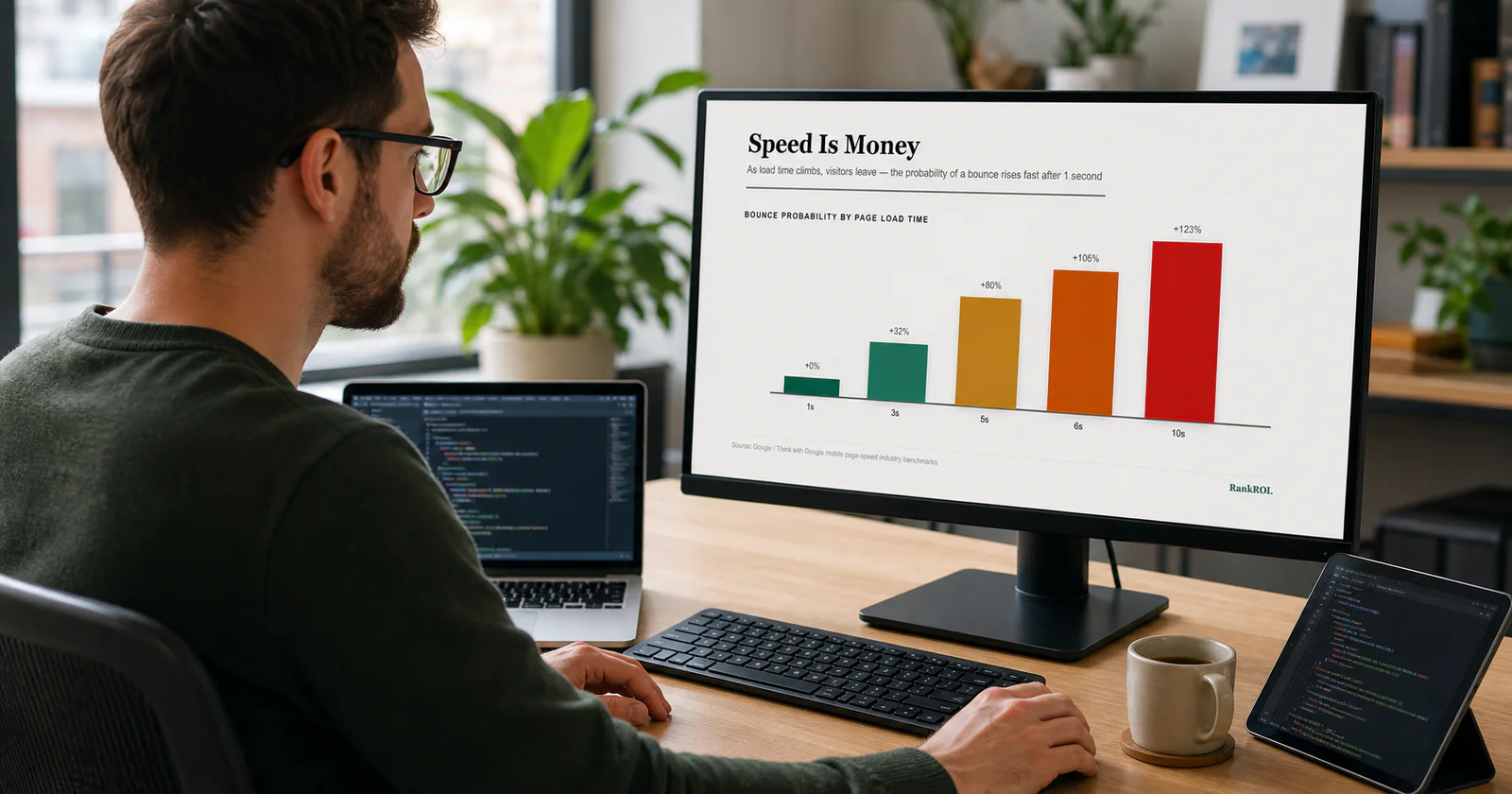
Slow load times cost you twice: visitors leave before they see your offer, and Google ranks slow pages lower through its Core Web Vitals. Every second of delay compounds — the further past one second you go, the more people abandon.
First, get your baseline. Run your site through Google PageSpeed Insights and note the mobile score and which Core Web Vitals are failing. That report tells you which of the fixes below applies to you.
Fix 1: Compress and right-size your images
This is the single biggest culprit on business websites — full-resolution photos loaded at ten times the size they display. Images routinely make up most of a page's weight. Export images at the dimensions they actually appear, compress them, and serve modern formats like WebP. On most sites, this one fix alone can halve load time.
If you only do one thing this week, audit your largest pages for oversized images. A 4MB hero photo that could be 200KB is the most common reason a business site crawls on mobile.
Fix 2: Lazy-load anything below the fold
There is no reason to load images and videos a visitor has not scrolled to yet. Lazy loading defers them until needed, so the first screen appears fast. Most modern platforms support it with a single attribute or a toggle — it is one of the highest-impact, lowest-effort fixes available.
Fix 3: Cut the plugins and third-party scripts
Every plugin, chat widget, tracking pixel and social embed adds weight and often loads its own scripts from elsewhere. Business sites accumulate these like junk in a drawer. Audit what is installed, remove anything you are not actively using, and be ruthless about third-party widgets — a single heavy chat or booking script can add seconds.
Beware "optimization" plugins that promise to fix speed by adding another layer. Sometimes they help; often they add complexity and their own overhead. Measure before and after — if the score does not improve, remove it.
Fix 4: Turn on proper caching and a CDN
Caching stores a ready-made version of your pages so the server does not rebuild them for every visitor, and a content delivery network serves your files from a location near each user. Together they dramatically cut load time, especially for repeat visitors and anyone geographically far from your host. Most hosts and platforms offer both — they are often just switched off by default.
Fix 5: Upgrade cheap hosting
The cheapest shared hosting crams thousands of sites onto one overloaded server, and no amount of image compression fixes a slow server response. If your PageSpeed report flags a slow "server response time" (TTFB) after the fixes above, your host is the bottleneck. Moving to quality hosting is the least glamorous fix and sometimes the most effective.
What to ignore
The advice industry loves complexity because it sounds expert. For a normal business website, you can safely deprioritise:
A mobile score in the high 80s or 90s is excellent and more than enough to compete. Chasing a perfect 100 is a vanity project that burns hours for gains no customer will ever feel.
Understand the three numbers Google actually measures
When you run the test, you will see three Core Web Vitals. Knowing what each means tells you which fix to reach for:
- Largest Contentful Paint (LCP) — how long until the main content appears. Usually dragged down by big images and slow hosting. Target under 2.5 seconds.
- Interaction to Next Paint (INP) — how quickly the page responds when someone taps or clicks. Hurt by heavy scripts. Target under 200 milliseconds.
- Cumulative Layout Shift (CLS) — how much the page jumps around as it loads. Caused by images and ads without reserved space. Target under 0.1.
You do not need to memorise the thresholds. You need to know that images and hosting drive LCP, scripts drive INP, and missing image dimensions drive CLS — so the report points you straight at the fix.
Test on a real mid-range phone over mobile data, not just your fast office wifi on a new laptop. Most of your customers are on phones, and the gap between how a page feels on your desk and in their hand is exactly where the lost sales hide.
The 90-minute speed sprint
- Measure. Run PageSpeed Insights on your three most important pages.
- Images. Compress and resize the heaviest offenders.
- Lazy-load. Defer everything below the fold.
- Prune. Remove unused plugins and heavy third-party scripts.
- Cache. Enable caching and a CDN, then re-measure.
Speed is one of the fastest wins in all of digital marketing because it improves rankings and conversions at the same time. And it rarely acts alone — if your site was slow, it is worth checking whether visitors were also leaking out for other reasons in our guide to why websites get traffic but no customers. Fix the five things that matter, ignore the forty that do not, and stop losing customers to a spinning loading bar.


Reader discussion
No approved comments yet.